atom-commit-templates
Written on September 29th, 2017 by Connor Bray
Easily set custom commit templates from the Atom UI
Setting a Git Commit Template
To enable your git commit template to take effect, this package writes to a .gitcommit file in your home directory, and updates your git configuration to use this file as a commit template e.g.
git config --global commit.template ~/.gitcommit
Keyboard Shortcuts
ctrl-shift-alt-ton Windows and Linuxcmd-shift-alt-ton OSXAtom Commit Templates: Set Commit Templatefrom the command palette
Input Dialog

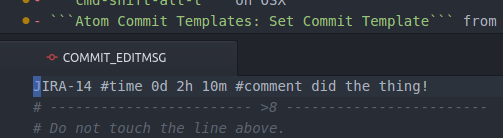
Commit Message Automatically Populated
Goes well with
- Git Plus - Git commands without the terminal!
- Git Control - A git GUI directly in Atom
Kudos
Kudos to the following, for making my life easier!
Feel free to share!